

Hi! I'm about to ask a pretty dumb question due to dumb choices I made- but, is there an option to remove the default movement layers have when they are made without 'create minimal layers' on? I just realized that the layers I put in and organized weren't made with 'create minimal layers' on, and I don't know how to remove the default movement of the layers 'breathing'? I don't know how else to call it- I would have simply redone putting in all the layers and organizing them but there are almost 200 layers and I'm not willing to redo all of that especially since I had also made the states/toggles I wanted to have because I left rigging the movement to the end 😭
I truly do love this program and how it can make such impressive and complex models- but I fear the complexity of it all is not good for my silly dumb brain, as well as my ambition blinding me from the fact that I am a beginner at making models.. I may have went too all out-
You can disable it per layer by using the T and I (talking and idle) buttons next to the Individual Motion sub-menu (breathing would be idle, by the way):
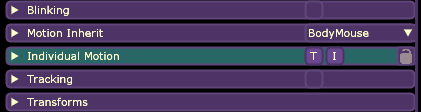
But if there are many layers that you want to fix, I'd suggest opening the .xml file of your model with a text editor and replacing (Ctrl+R in Notepad) all breathing="true" with breathing="false"
I hope that helps!
Edit: I've realized non-minimal layer also add a "talking" motion (the T button in the screenshot above), so if you want to get rid of that too with the text editor method, you'd have to replace motionStretch="2" with motionStretch="0" bounceType="1" with bounceType="0"
To turn off talking, the flag is actually "bounceType" not "motionStretch". The default bounceType is 1 so you want to replace bounceType="1" with bounceType="0"