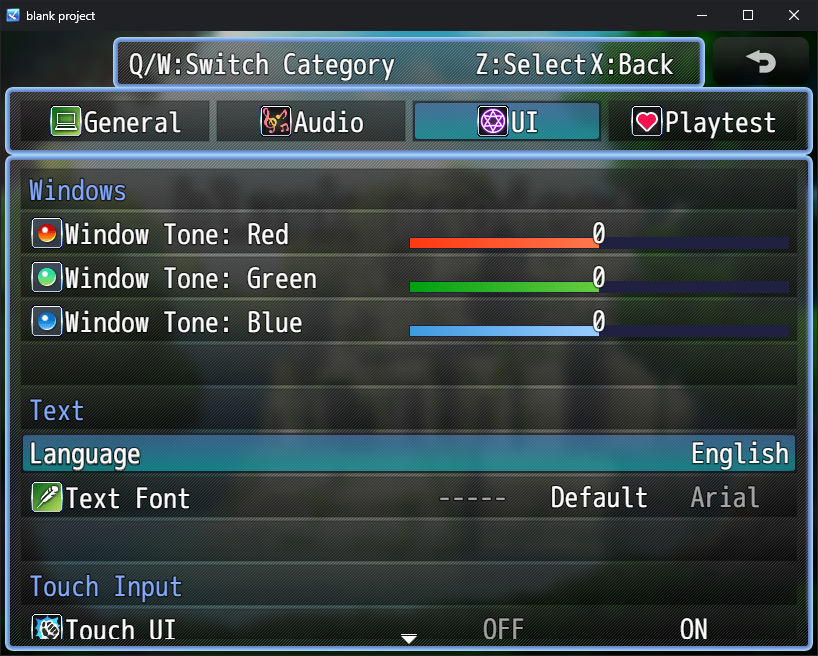
I'm not sure if I'm doing this right, but I'm trying to display the list of languages using the availableLaunguages variable. Specifically, I'm displaying 3 fields, the last language, the current language, and the next language.
So I'm using ConfigManager.availableLanguages[value-1], ConfigManager.availableLanguages[value], and ConfigManager.availableLanguages[value+1] for this.
However, only 1 language is appearing (I think it's only showing the current language, ConfigManager.availableLanguages[value]) when I run the game.
Is there a better way to do this?
I'm using VisuStella MZ Options Core for reference.
Here's my code for the Functions: JS: Draw Option:
I'd like to see some games picked that are not normally in the Popular/New/Top featured categories, or have not been featured on the front page. I'd also like to see some games that aren't available or featured on other storefronts (itch exclusives). Agreed with having at least 1 physical/TTRPG per bundle too.
Really enjoyed this, and the intro sequence- wow! The pixel art and animation was just amazing.
I noticed a couple things that I wanted to document for you.
1. The controls are not clear in the game. I know they are here on the web instructions but I (and I'm guessing others) weren't able to figure out controls when booting the game up for the first time. They are also non-standard- I was pressing spacebar, clicking the mouse, Enter key, escape, Z, X, etc. but I almost gave up until I remembered there was some text on this itch page. Overall I think it might seem redundant, but would be nice to have button indicators in the game UI.
2. Accessibility features and settings would also be nice to have- I think there's only the full-screen toggle (or at least that's all I was able to trigger in the game) when selecting the settings. Specifically, a sound toggle for SFX and Music levels, or just master volume because while wearing my headphones, I felt that the sound for mons cries was very loud compared to other sounds, even with my system volume pretty low.
Thank you for reading, and I wish you luck and success with your game!
Mine's a simple arena fighter. It's fairly bare-bones and I scaled it down from what I was originally thinking I'd be able to do, but I'm glad I at least got it functional and submitted to be published.
The way it works is you're in a lobby and you can search for a (NPC) opponent to fight. If you win, you gain HP and gold, and can choose to either go on and fight another opponent, racking up a bonus multipler, or retire and return to the arena so you can upgrade your weapons.
I'm looking forward to improving on the concept in a new version/game later. :)