The game feel on this was so good! The best feeling game I have rated for sure. I love the brief delay when you loop around the edge of the screen. Also great call showing an indicator for where the player is off screen. Just a great execution of what's normally a gimmick in other platform games.
Casey
Creator of
Recent community posts
I like the "remote control" idea, and it was the voiceover really sold me on it. It got me thinking about contextual lines for actions (like "push") or hints, maybe even replacing UI (such as the narrator or the remote guard having voice lines that trigger at low health, etc.)
Really just a ton of promise here!
Great work and congrats for making something (especially for a jam!) not using an engine. I totally agree with the sentiment about engines getting in your way, especially if it's not your day job. If you want to change your focus from the coding to the other aspects of gamedev, especially if you want to expand the scope of your project (jam or otherwise) I do hope you give an engine a try though!
I don't normally like these games but I had a good time. I know it's a rage game, but I think some jump forgiveness (letting the player jump for a few frames after they leave the ground,) or just better feedback about when the player is able to jump would have helped me a bit. I died so many time to a lost jump 😭
That said, I loved the perfectly cut scream every time you died!
I love the use of an error message as the title screen! The UI in general was very nice.
The gameplay seemed really promising but the wait times between attempts was way, way too long considering this is a one-hit-kill game. Super Meat Boy or Astro Bot are perhaps on the opposite ends of the difficulty scale but both went out of their way to make sure you could try again right away.
Very interesting! Entering the TV world and moving items between worlds is very promising mechanic and I liked the way you used it here. I think I managed to get stuck by getting some items out of order though 😂
Some polish suggestions if you're interested in working on this more:
On screen control hints would go a long way to smoothing the experience. Dedicated controls for the VCR buttons as well, as others have suggested.
The house was pretty dark, but even in the Compatibility renderer you can bake lightmaps, which can help bring up your light levels (using your existing lights) that looks much better than just brightening up the ambient color in the WorldEnvironment node
Aww thank you for playing! I'm glad you enjoyed it. I went back and forth with the run speed. Moving too quickly made the stage spawning feel a bit anxiety-inducing... I do agree the candy collection is a bit tense right now though. I thought about dropping some tiles when transitioning to day so you had less ground to cover, but was worried that might cause issues too.
Oh nice video, I have no excuse to not solve my stutters now! I knew the root cause already but never looked for a systematic solution to compatibility mode pre-compilation. I actually have all of my tres materials on objects on the title scree, but I forgot I have some one-off materials in scene files and those are causing my stutters.
Beat it a couple times, found my dog and... something else entirely? I guess that's the multiple ending?
I liked how the 3D backgrounds were incorporated, especially the foreground stuff, they did a great job of adding depth to the visuals (literally!)
Cute and a great example of how adding even silly sound effects can make a game feel that much more complete.
This was really cool and seemed more or less complete! Amazing work! I am not a big fan of horror but I turned my brain off so I could experiment with the controls which I thought worked surprisingly well.
I got a ways in but wound up closing my tab by accident by crouching and walking (which is Ctrl+W!)
Edit: Ah, I see what Tom is missing in 1:5 😉
I did fall to my death, it just stood out as annoying because it was the very last jump of the game 😂
The character is already a Capsule? Are you using CharacterBody3D and move_and_slide? Or your own custom movement?
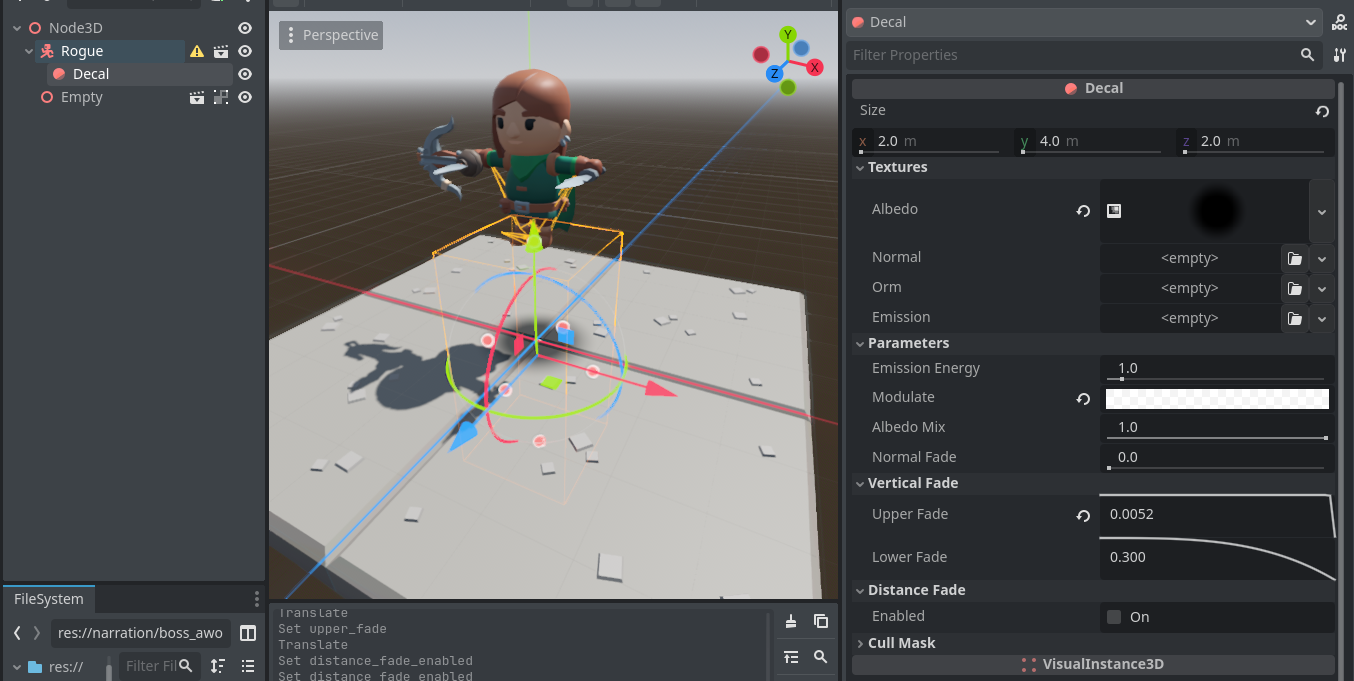
For the blob shadow, in the Forward+/Mobile renderer you can use the Decal node with a radial gradient on it (screenshot below.) For the Compatibility renderer you need a custom shader like this one but the same basic idea applies. It's not that natural, but the idea is you use it in addition to the lighting shadow just for assisting the player. You can fade the decal out as the player gets close to the ground, or keep it as a sort of cheap ambient occlusion.
This was a neat idea, almost like (or could become?) a deck builder. I found myself using the same 2 scares until getting the final powerup, so balance could use some work. I didn't notice the timer initially, so I ran out of time at 300 candies, which was a bummer. Maybe a candy quantity check halfway though would help gracefully end a doomed run early?
Neat! I had played through the whole thing and somehow managed to not crash out after jumping past the exit on the last stage. Some things I noticed:
- I feel like 'Tom got hung up on colliders a lot, especially where there were elevation changes. If you are not already using them, Capsule collision shapes are great for avoiding this, you even get a bit of auto-stair-climbing for free.
- For the isometric portions, a shadow blob decal on the ground under the player would have helped a lot with lining up jumps.
This is done with Fog, specifically depth fog. The fog both fades out the tile and creates that night white glow in the corner where the sun moon is. Depth fog, in contrast to exponential, lets you specify a unit distance where the fog starts and stops, so I could precisely tune it. My camera is 38 units from the player so even a very, very small density value for exponential fog still causes some haze in the foreground.
Here's my exact settings for the night mode fog:
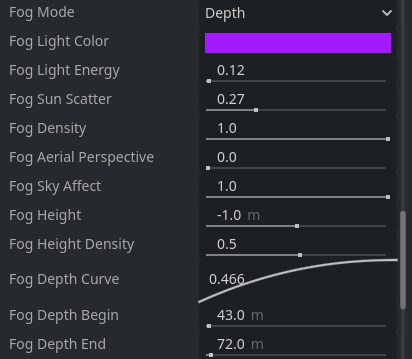
Thanks for playing! I'm glad someone noticed the control hints (there's also one if you just leave the first pumpkin alone)
Godot makes controller support so easy! It's a shame you don't see more more people implement it.
Terrain generation uses the wave function collapse algorithm, only simplified a bit to just use a simple socket enum to match tiles. Each tile (check this comment here to see the tile set) can connect to either a blank floor, a fence, trees, or a path. As new tiles come in range, only tiles with the right socket facing the right direction are eligible to spawn, and the actual tile is picked at random, with a weighted average. The secret sauce in the generation is that the stage itself is only 8x8 tiles. You're actually walking across a 2-dimensional ring buffer!
Regarding the cape, I didn't want to mess with Kay's rogue model, so it's just Softbody that's using the original model's cape mesh. I just copied the mesh resource from the inherited scene's MeshInstance, and pasted it into a new Softbody node and played with the damping and drag until it stopped freaking out.
The jump is the example CharacterBody3D script jump left in totally unmodified because it was just enough to get you over half-tile gaps 😂
The candies actually are RigidBodies, and they did used to explode out of the pumpkin exactly like you suggested! I tried shooting them at an angle and straight out, and with a bunch of different starting patterns, but the number of candies that actually stayed on the stage was too inconsistent and I had to give up that strategy.
Thanks for playing! Using only art and sounds from free packs helped a lot with focus (and overthinking things!) I got super motived as soon as I got the first procgen working and connected it to Bastion (which was an accident! I was originally thinking Tunic was my inspiration)
I guess that candy sound is a lil loud huh...
Oversimplifying a bit but webassembly has a 4GB memory limit, and in practice you can't even use that much. Also unlike a desktop build, WASM builds can't move data from memory into swap space as they run out of RAM.
What I'm getting at is it's quite possible that you have a memory leak in the desktop build too, it's just much harder to run out of memory in that environment.
Thank you for playing and thank you for the detailed feedback! Sorry about the pumpkin disappearing, the level is only ever a few tiles wide so pieces get recycled very quickly 😂
There's nothing too labor intensive about the look, just a bunch of tricks (especially to make up for the shortcomings of the web build.) If there's anything in particular you're curious about, feel free to ask 😊
Wandered around waaaaay too long to find the church, and then got beat up in my first encounter because I forgot to heal. 😭 I'd have liked to get farther but have to admit I lost interest when I was sent all the way back to the start.
I liked the cozy sorta-Earthbound-ish style and setting, character art was cute too!
Mechanically pretty interesting, I don't think I've played anything like it. Solid idea and pretty clean implementation. My main feedback is I had trouble reading the screen. Animating the jump between lanes, and providing a better indication that powerups were still active would have helped me a lot.