
Indie game storeFree gamesFun gamesHorror games
Game developmentAssetsComics
SalesBundles
Jobs
TagsGame Engines

setalia

5
Posts
A member registered Apr 20, 2024

Recent community posts

The files are just title.webm and titleb.webm.

However, a second bug occurred, in that loading the game would still play the title screen movie (although not visible, the audio would overlap).

I noticed that I had "Options and Load Game Video?" turned off, and the video doesn't show on the options and load game (but the video's audio still plays). I don't know if that's intended.

When I turned on "Options and Load Game Video?", the video shows on those screens, and it stops correctly. However, when I quit to title, there's 1 frame of the video at its last timeframe before it resets back to the beginning.

So that's another workaround to fix the issue. I'd rather the video not show on those screens, but at this point I'm just thankful it mostly works.

Something strange is going on, but I think I've found a workaround.

  • I tried setting a different movie as the background movie.
  • In the editor: the original movie still played (not expected)
  • In the deployment: the different movie played without an error (expected)

This now leads me to believe that something between the editor and the deployment is trying to play two movies at the same time? Whatever's going on, I successfully got a workaround by making a copy of the title video and giving it a different name.

Some additional information:

  • Movies in-game work just fine. It's only the title movie that bugs out.
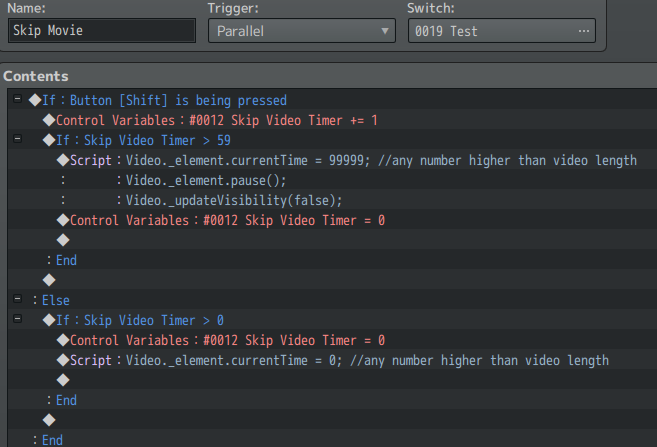
  • I have a skip movie hotkey I scripted into my game to skip in-game movies. A while back, I would get the same error if I skipped things too fast. I fixed it by adding the "currentTime" line. Maybe that can help get you on the right track for why it's happening? Maybe something is happening too fast?

I'm still open to sending you my exported project if that'd help you investigate.

I'm using version 2.8. (Although it was present in 2.6 also, I upgraded to see if that fixed it, and it didn't.)

I also originally had only .webm, but I added .mp4 also, and that didn't fix it, either.

I'm exporting to Windows.

Hi, I'm running into a bug when I deploy my game. It works fine in the editor.

  • I'm only using the background movie with no special settings.
  • The issue persists even if I deploy with only the Ritter Title Movie Plugin enabled.
  • If I deploy with everything except the Ritter Title Movie Plugin, there are no errors throughout the entire game.
  • I tested this on two different computers and the issue persists.

No video plays when the game starts. When I choose "New Game," this appears:

I'm willing to send you my exported project if it'd help. I'm also happy to leave a generous tip if you can fix this soon!