
Indie game storeFree gamesFun gamesHorror games
Game developmentAssetsComics
SalesBundles
Jobs
TagsGame Engines

Tamschi

160
Posts
8
Topics
160
Followers
146
Following
A member registered Oct 05, 2015 · View creator page →

Creator of

Recent community posts

(1 edit)

You’re welcome, it only took a few minutes to find with your description.

If you’d like to help me out in return, please consider mentioning me to other RPG devs you know. My plugins aren’t flashy, so the grapevine seems to be more effective for actually getting eyes on what I make 🤔
This bug is now fixed in Ver. 1.1.5: Boundary indexing fix.

Regarding ”[Violation] ‘requestAnimationFrame’ handler took ###ms”, that’s a performance warning with unspecific cause. It means something took too much time and caused a lag frame.

You can figure this one out using the profiler, but usually it’s just something like resource loading not running in parallel.

This is now available as Window_Base.drawText Ignore CanvasTextAlign Numbers.

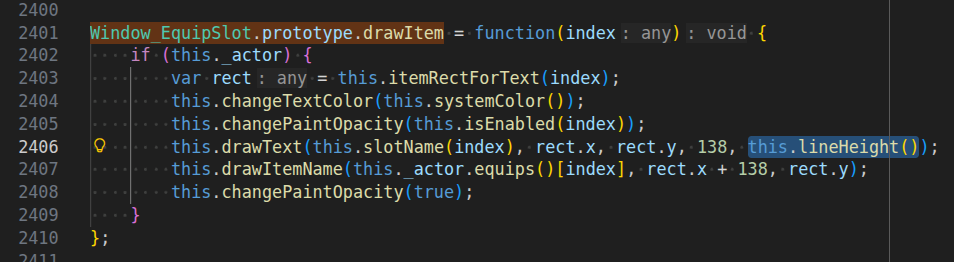
A call stack would help, but a a 36 appearing there sounds like someone is calling drawText on Window_Base as if it was the method on Bitmap. The former doesn’t have a lineHeight parameter preceding align.

I’m pretty certain that this line here in Window_EquipSlot.prototype.drawItem is the culprit:
this.drawText(this.slotName(index), rect.x, rect.y, 138, this.lineHeight());

The bug is present in both MV and MZ, but fixed in the YEP_EquipCore.

You can just delete the , this.lineHeight() part there to fix this, but I’ll make plugin to auto-check that argument tomorrow, too.

That’s a great bug report, yes, especially that it gives me a good way to reproduce the issue.

I roughly know what causes this. I’ll play around with the rounding a bit to see if I can fix this pixel-perfectly (or at least clamp it to the correct area of the bitmap). Might take a few days though, it depends on how busy I am next week.

Are you using the latest version 1.1.4?

It’s Bitmap.drawText CanvasTextAlign Default Fix / TSk_Bitmap_drawText_CanvasTextAlign_Default_Fix.js, to be specific.

Note that I defaulted it to ‘start’ instead of ‘left’ since I think that’s what the web API does internally when that error occurs.

Done. I’ll update the page in a moment, but the file is there.

(Untested, but it’s a really simple issue and I’m quite confident.)

No worries 🙂

Admittedly, this only happens to work because I wanted to support distinct left- and right-click behaviour on the same Event (the hover tags are combined between those entry points, btw), but this approach that makes use of the existing engine is something I aim for in general.

That’s (part of) why so many of my plugins are rule-based instead of relying on Note Tags now.

Use “Exit Event Processing” as first Command and then “!OnTouch:” right after.
(“!OnTouch:” acts as entry point, so Event processing will start right at that line.)

The Event may still turn to face the Player if it’s not Direction Fix.
If the Event should turn, you can do that manually with “Set Movement Route…” (“Direction Fix OFF”, “Turn Toward Player”) and then reset with “Revert OnTouch Turn” and “Set Movement Route…” (“Direction Fix ON”).

(1 edit)

Glad to hear that!

If the lag gets too serious, a “fix” may be to use another plugin to draw the cursor onto the canvas, but that only makes both lag synchronously which I don’t love. (It can be quite noticeable at lower frame rates.)

If there was a native-cursor changer with tags feature, I could probably integrate with that. Maybe I’ll make one eventually, but it’s likely quite a messy project and could cause a lag frame when the cursor is adjusted.

If I read the source code right, this doesn’t handle the boolean parameters correctly yet. RPG Maker recursively encodes all except string-like (except @type note, that one is encoded) parameters as JSON, unfortunately.

Ideally, you should also handle the empty string, since you can easily delete the parameter values with Del/Entf.

(1 edit)

And thank you for your patronage, of course! Very appreciated.

Ver. 1.1.4 is now online and includes direct getImageData parameter validation.
I hope that I also fixed what was causing the invalid parameters in the first place (at least when the window isn’t shrunken), but that’s tricky to debug and with this check it won’t crash.

Just a heads-up that I’ll upload another small patch most likely tomorrow since I didn’t quite get the bug I thought I fixed last time.

There won’t be any changes to the parameters or behaviour, but if you get a type error while hovering over a sprite that overlaps the edge of the window, that’s likely that. (It’s annoyingly hard to debug because I can’t reliably provoke it.)

You can likely replace the icon using this old program: https://www.angusj.com/resourcehacker/
I remember using that to get my hands on executables’ icons as a child 😄

That warning is most likely just because RPG Maker picks text colours from the window skin image. It’s not optimal, but as far as I know doesn’t happen anywhere close to frequently enough that it would cause a noticeable slow-down.

Fair enough. As long as they don’t change anything noticeable by default, it should be fine.

I’ll wait until the dead code is cleaned up then to see which APIs I can actually use.

I think I can work with this, but I’m not sure why you tried to replicate the Game_Picture/Sprite_Picture API, i.e. the new

get _pictureName() { ... }
set _pictureName(value) {}
picture() {}

that you added to Sprite_UIPicture. These aren’t useful as extension points since they aren’t used internally by your plugin at all.

You also exposed the classes on window directly, which increases the risk of collisions with other plugins. (Letting third-party plugin devs replace classes entirely in not very helpful, as it makes for very brittle integrations that risk crashes as plugins are updated.)

I’ll probably postpone this for the time being, since you also started to mix in other features. I don’t think that’s the sort of clean single-purpose plugin I was looking for.

Thanks, that sounds perfect! I’ll have a look soon.

I just submitted a refund request to Itch. In my experience these should go through relatively quickly, but do let me know if it takes longer than a week.

Close call for “within this year still”, but I made it I think ;)

Version 1.1.2 has this now (a bit more powerfully than you might expect). I’m a bit occupied with family/vacation, but I’ll likely be able to update the page text in a few hours.
Note that there’s a slight time lag between native cursor movement and how these hint sprites move, which I don’t think I can avoid.

Thanks a bunch for the write-up!

Have you tried using the normal/non-SDK version on deployed games? As far as I can tell, that’s usually the one RPG Maker deploys games with. Maybe the folder structure changed too much between versions of NW.js to update it directly in the install directory though.

I mentioned this in the Discord but it seems you forgot:

I’d like to add specific support for this plugin to Dynamic Pictures. To do that, it would be helpful if Sprite_UIPicture and ideally also Sprite_UICommand were exported in this plugin’s API.

(1 edit)

In my test, it seemed to play the skill animation and then a miss/evade motion on the target.
I just tried changing Game_Action.prototype.executeDamage instead, but got the same result.

At least currently, it doesn’t look like something I’d be likely to figure out within an hour, so a ‘true miss’ implementation that doesn’t show the skill animation isn’t something I’ll attempt for now.

Edit: Typo.

The ‘fake’ implementation was easier.

I also made one that reports those zero-damage hits as evaded instead, since it was a one-word difference.

(1 edit)

Sounds doable, and like a good small request!

To clarify, which one would you prefer:

  • Damaging actions that do 0 damage miss instead (true miss) or
  • the target and text/visuals will act like there was a miss (fake miss)?

I haven’t looked at the code yet, so this is just in case either isn’t too complicated for a “sketch plugin”. It could make a difference in terms of side effects (like whether status effects are inflicted).

Please use the Requests and Feedback Thread as needed.

To ask for help with a plugin, please include the plugin name in the thread title, for example “[Picture Tasks] I found a bug!” (without quotes).

Sketch Plugins community · Created a new topic Requests

You can post plugin requests here. I may make the plugin if I can do so within an hour by hand.

Feel free to post any feedback or comments to existing plugins here if you don’t think they warrant a thread of their own!

No, that’s out of scope for this plugin.

Looking at the engine source, this should be the default behaviour if map and battle music or sounds (respectively) differ, though. It’s possible that another plugin in your project is interfering with that.

(2 edits)

Try to deactivate just half of the other plugins.

If that “fixes” it then re-enable just half of those, otherwise disable just the other half. Continue narrowing it down until you’ve found an incompatibility, then see if it works with just that disabled. (Otherwise there are probably multiple incompatible plugins.)

You could also attach a screenshot of the plugin list you’re using and I can make some guesses. If you know a bit of JavaScript, you can also do a global search for TouchInput in your project to see which other plugins manipulate it.

That’s good to hear!

I’ll see to making a stable release when I have some time to. Shouldn’t change anything aside from documentation at this point.

(1 edit)

I uploaded a release-candidate version that should be able to fix the flickering issue.
(It’s fine to use this in production, but there’s a possibility I may revise the added feature in a way that requires manual adjustment.)

If you turn on the new “Prevent Battle Flickers?” parameter, this should now prevent screen flickers and flashes. It’s off by default because there could in theory be unintended side-effects.

One caveat that I noticed is that the Actor stance seems to revert to the idle pose while the menu is open (when doing so from a turn-based Troop Page). I’m not sure if that’s intended behaviour that always happens when a blocking Page runs, or if there’s still an unresolved glitch.

I didn’t test with battle background image yet.
(Using the blurred map as background image in battle is managed a bit differently.)

I’ll try this in a few hours, since it’s currently still night here.
Loading the images right as the scene is created should fix it (in theory), as that should normally make SceneManager wait until assets are loaded.

You mean images displayed through “Show Picture”, right? I suspect the problem there may be that a different set of slots is used while the Party is in battle.

These should be displayed as normal within the Scene_Battle running in the background of the menu.
There could be unintended effects if SceneCustomMenu tries to display them too though, like animations being twice as fast.

I gave it a try and didn’t notice any glaring issues as-is: The battlers seem to appear correctly behind the menu and the battle didn’t proceed until the menu was closed. The battle also didn’t restart, as far as I could tell.

The battler sprites flicker for one frame when entering or exiting the menu. I think this is a general issue with Scene_Battle, as I can see it even without Live Menu enabled when exiting the custom menu (if I slow down the frame rate to make it more noticeable).
I’ll see if I can make the Scene_Battle load the current battler sprites once right when it starts, which in theory should fix this in general. That could cause a slight (likely unnoticeable) delay when entering battle otherwise, though, so I’ll make it optional.

You should otherwise be able to use the plugins together without issue already, but do let me know if you notice anything else!

Found it, thanks! (I am embarrassingly unfamiliar with the included DLC 🫥)

I’ll start looking into it, but it’s likely going to take a few days before I report back.

If you point me to the base plugin required by SceneCustomMenu, I’ll do some testing to see how well I can make them work together in battle.

(2 edits)

This should now be available in the release candidate (Ver. 1.2.0-RC.1) and requires Dynamic Characters Ver. 1.4+. (It should show a popup once if you try to use this without updating that.)

The feature is practically done, but I didn’t feel like testing it on Halloween, so for now it’s a release candidate that technically could see breaking changes to that feature. I think that’s unlikely, though.

Looking at its source code, I’d say there’s a very good chance it’s fully compatible outside of battle.
Make sure to load SceneCustomMenu after Live Menu and Pause, so that custom tiled backgrounds won’t be hidden behind the live backdrop.

It seems to require a base plugin that I don’t readily have, though, so I can’t actually test this right now.

Inside battles, unfortunately it resets its SceneManager._callCustomMenuFromBattle flag in a way that will glitch out when the battle is used as live background. This is likely patchable on my end, so please let me know if you’d like to open custom menus during battle.
(There could still be other glitches related to not blocking the battle processing in the right place. I’d have to properly test the plugins together to figure that out.)

Alternatively, I could easily add an option to not use a live background if a Scene_Battle is encountered on the scene stack.

Hm… looks like the Itch.io upload now has Steam DRM, which of course then fails to launch because I have “no licenses” there.