

One more thing to ask! I wanted to add notification sounds to the phone when the player is receiving/sending messages. I figured out where to add the sound when the notification pops up on screen, but I'm not sure what area to put them in for sending/receiving messages. Do you know where I should look within the phone.rpy file?
Yea this one is a little more complicated, it will be in the next update but if you want it now-
Create this function anywhere in the init python block at the top (will reply to this with a copy paste):
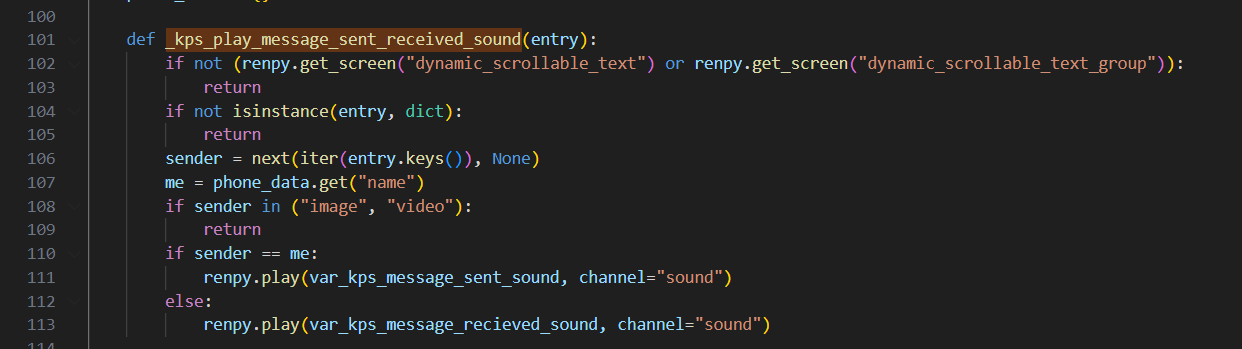
(The vars in using here I've just added to config and done = "thesoundfile")
Run the function in these 3 places:
1-

2-
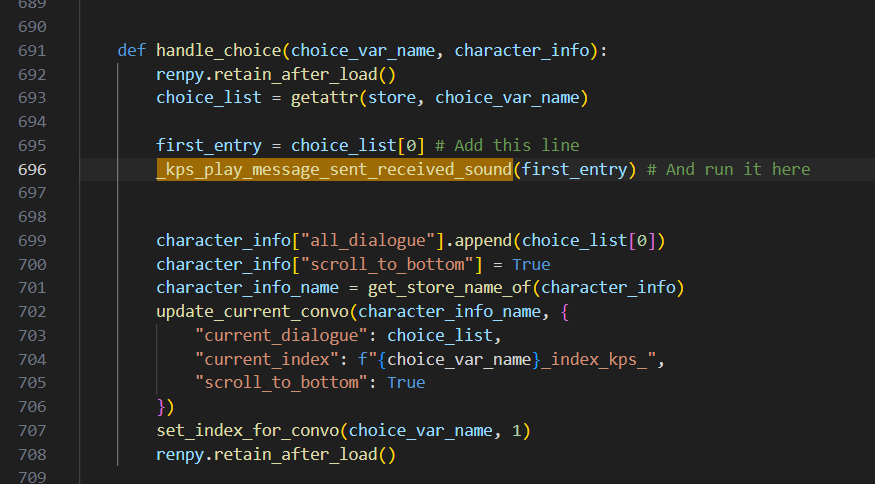
3-
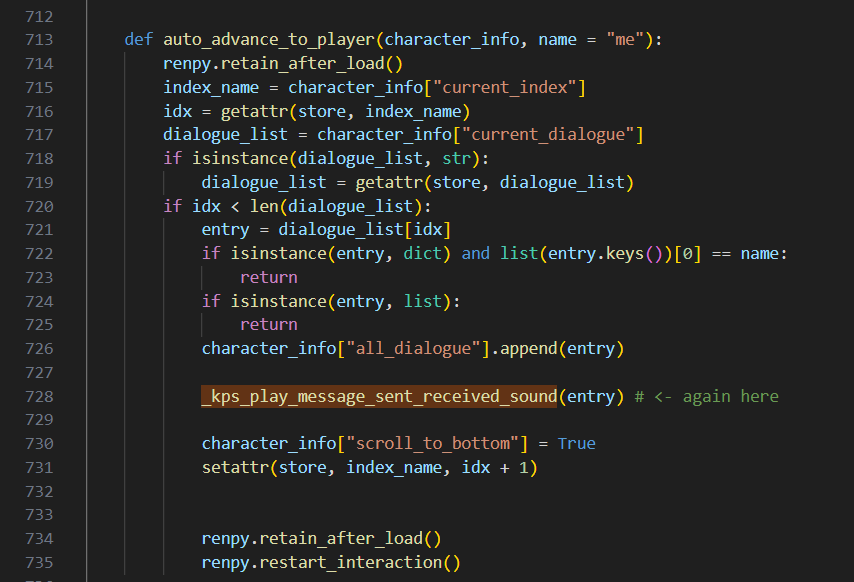
That should do it :)
(Also, add "code" with the image and video, so it doesn't play a sound when code executes)
I haven't decided how im going to handle image messages yet, but you can just change the 'return' there to a custom 'sent image message' sound if you want. Or if you've only ever going to be receiving images just set it to the received sound.
def _kps_play_message_sent_received_sound(entry):
if not (renpy.get_screen("dynamic_scrollable_text") or renpy.get_screen("dynamic_scrollable_text_group")):
return
if not isinstance(entry, dict):
return
sender = next(iter(entry.keys()), None)
me = phone_data.get("name")
if sender in ("image", "video", "code"):
return
if sender == me:
renpy.play(var_kps_message_sent_sound, channel="sound")
else:
renpy.play(var_kps_message_recieved_sound, channel="sound")
5 days ago(+1)
Just uploaded the new version with all this in, also adds the volume of them to the settings screen of the phone. There's a few extra checks it does for messages appended using functions as well.
Quick question. Is there a way to set up contacts so that they only show up in the phone once you reach a certain point in the story? Like, one at a time? For example, the mc gets a new phone, meets a person, they give them the number, and then it shows up on the phone. How would I set this up? Currently, in my code, all of the text conversations are showing up on the phone, but at this early point in the story, there should only be one contact, not all 13. Sorry for bugging you again!
21 hours ago (+1)
Sorry I just noticed you'd messaged again. When you create the conversation using the kps_create_conversation() only add them as a member, then use the add member function (its in the newest release) to add your mc to it later, it will instantly appear on their contact list :) You can create a conversation with 0 members if you want, theres nothing stopping you, but the second a member name == a phone name, the conversation will appear