I just checked and I confirm version 1.1.4.
GDV1185
Recent community posts

I stumbled upon this little bug by accident.
I tested it on a project without any other plugins to see if it was one of my plugins, and it wasn't.
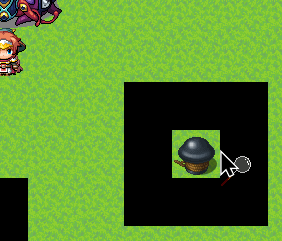
As you can see from the image, the mouse pointer is just one pixel beyond the tile where the event is located (the image of which is taken from the map's tilesetB) and calls up the cursor image, and when I click the mouse, it triggers the event. (Even without the extra cursor image, the event still triggers, but I admit that without the cursor image, I never would have found this bug.)
I discovered that the plugin basically ALSO checks the first column of pixels in the graphics to the right of the one you're using, whether it has opaque pixels (even if they aren't displayed graphically).
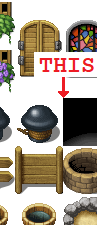
This happens with both a "charset" and a "tilesetB/C/D/E". (The other attached image is taken from the "Outside_B" base graphics.)
It only does this on the right side, and I created graphics specifically to show the other three sides as well, but they look fine.
I hope I've been clear and helpful with all the information I've been able to find.
Hi, sorry to bother you.
I was converting the events to your new plugin when I realized I can't make events interactable ONLY with the mouse; yes, in the sense that if I approach with the character and interact with the keyboard instead, this event doesn't activate.
I reread the help section to see if I missed something. Is there a way?
I tried alternatives, with conditions like "TouchInput.isTriggered()" and thought it was a good idea, but then I found that I can still interact with the keyboard if I click the mouse somewhere else at the same time, or "TouchInput.isTriggered() && !Input.isTriggered('ok')", but even in a particular way, the problem here is that the event doesn't activate if the keyboard and mouse are pressed simultaneously.
Honestly, I'm fine with any solution, even a "dirty" one, like activating a switch/selfswitch when you interact with the mouse using this plugin, but if it's already integrated into the plugin, enlighten me and forgive me in advance for not having seen it.
I tried the plugin and managed to get it to not clash with two other plugins. (Galv-MapProjectiles and triacontane/Wisarut Perunawin-PuictureCallCommon if you're curious.)
It seems to work, and I'm converting the events that used the old MouseSystemEX. I need to get used to it a bit, since the mechanics are different now, but nothing too complex.
As soon as I have any problems with your plugin (I have a slight lag with the image and cursor, but nothing too annoying), I'll let you know.
So far? Very satisfied!I checked at Christmas, but I admit I'd given up hope.
Then I checked again today! xD
I got it right away and now I'm testing it.
Maybe it'll have problems with the other 25 plugins in the project...but I'm very careful.
Fingers crossed!
Thanks for now, and I'll let you know as soon as I have some time!
Yes, an icon next to the mouse, that would be exactly what I needed!
I understand that your plugins aren't a priority right now, but if you add this in the future, I'll keep checking this page for updates and will stop adding auxiliary events to characters.
It'll take a while, but I'm really looking forward to this update!
I consider your plugin an evolution of the famous System Mouse Ex, but I notice that your plugin does not do one thing: the ability to call icons on the mouse like MouseEx, will you implement it?
For my project I use character charset that are 3 tiles high and I'm using ausilliary events to let the baloon icon to appear and to interact in the upper tiles, it's not very practical...
Hi!
I want to thank you for this plugin, because it has the solution I was looking for a while.
So I ask you if I can use the code of this plugin directly in an event call script? (I need a moment where I have to put a password with a different window style and without the outline, and then return to the normal window style and with the outline.)
Of course I will give you credit (if one day my game will be complete...)
P.s. However, if I may suggest, could you make it so that with a script/plugin command, you can decide the size of the outline, so that you can change it for any reason during the game?
P.p.s Thanks again!
Salute e grazie per questo magnifico plugin!
Volevo chiederti se è possibile fare in modo di rimuovere il bordo nero delle lettere quando si inserisce il testo/password.
Volevo imitare l'effetto di una password inserita a PC, ma purtroppo il plugin GALV_MessageStyles non si attiva con le parole inserite col tuo plugin.
C'è la possibilità di rimuovere tale bordo, solo quando inserisco la password?
Ti ringrazio in anticipo del tuo tempo.
Sinceri saluti.