

Such a simple solution already integrated, now I'm embarrassed...
Thank you so much! It works like a glove.
No worries 🙂
Admittedly, this only happens to work because I wanted to support distinct left- and right-click behaviour on the same Event (the hover tags are combined between those entry points, btw), but this approach that makes use of the existing engine is something I aim for in general.
That’s (part of) why so many of my plugins are rule-based instead of relying on Note Tags now.
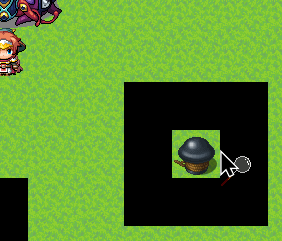
I stumbled upon this little bug by accident.
I tested it on a project without any other plugins to see if it was one of my plugins, and it wasn't.
As you can see from the image, the mouse pointer is just one pixel beyond the tile where the event is located (the image of which is taken from the map's tilesetB) and calls up the cursor image, and when I click the mouse, it triggers the event. (Even without the extra cursor image, the event still triggers, but I admit that without the cursor image, I never would have found this bug.)
I discovered that the plugin basically ALSO checks the first column of pixels in the graphics to the right of the one you're using, whether it has opaque pixels (even if they aren't displayed graphically).
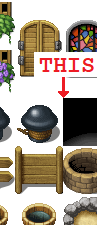
This happens with both a "charset" and a "tilesetB/C/D/E". (The other attached image is taken from the "Outside_B" base graphics.)
It only does this on the right side, and I created graphics specifically to show the other three sides as well, but they look fine.
I hope I've been clear and helpful with all the information I've been able to find.
That’s a great bug report, yes, especially that it gives me a good way to reproduce the issue.
I roughly know what causes this. I’ll play around with the rounding a bit to see if I can fix this pixel-perfectly (or at least clamp it to the correct area of the bitmap). Might take a few days though, it depends on how busy I am next week.
Are you using the latest version 1.1.4?