

Since the floor does not cast shadows you can treat it as a normal object without any glare related code. It would work out of the box. Btw I suggest you to use the nine slice feature of gamemaker with the repeat flag set to have more performance and use less “floor pieces”
i was using floors to not cast shadows upon the floor area... so i do need floor to have a mesh_set_height value greater than the walls.. can't use a standard object cus that just lets in unrealistic inside shadows from directional light.
see the wall shadow above the floor if i'm not using glare setup code in "floor" obj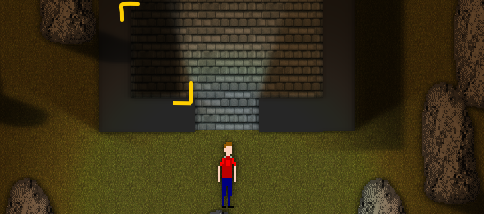
is there a way you could make a simple workaround that works with multiple floor segments?
I can't use just one obj for floor cus the player houses in my game are editable and modules...
also, is there a way to turn off/on a shadowcaster? I implemented a non-shader lighting system that was able to and have finished code that requires the shadowcaster(s) to be enabled/disabled based upon the house shape (so the player can walk from module to module in the house